Chapter 04: User Identity in AdTech & Programmatic Advertising
Identify is one of the most important functions of AdTech and programmatic advertising. For advertisers, it helps them identify and reach their target audience more effectively to increase campaign performance. For publishers, it helps them create better targeting options for advertisers to increase their ad revenue.
In this chapter, we’ll define what identity means in AdTech and programmatic advertising, explain why it’s important for advertisers and publishers, and showcase some of the main identification methods used across various digital channels.
Key takeaways
- User identity in digital advertising refers to the methods used to recognise individuals or devices across different websites, apps, and platforms for targeting, measurement, and attribution.
- Digital advertising relies on user identification to deliver personalised ads, maintain frequency caps, attribute conversions, and measure campaign effectiveness–a stark contrast to pre-internet mass media approaches.
- Identification methods vary by environment: browsers use cookies and device fingerprinting; mobile apps use advertising IDs; and emerging channels like CTV use IP addresses.
- First-party cookies (set by websites users visit) are more privacy-friendly than third-party cookies (set by external domains), which face increasing restrictions across browsers.
- Device fingerprinting creates a unique identifier based on browser and device characteristics without requiring user consent, raising significant privacy concerns.
- Universal IDs attempt to standardise identification across the ecosystem, evolving from cookie syncing solutions to identity frameworks based on hashed emails or phone numbers.
- Other alternatives to third-party cookies include Google’s Privacy Sandbox, the IAB Tech Lab’s Curated Audiences, the use of first-party data and data clean rooms.
- The digital advertising industry is transitioning toward privacy-centric alternatives as traditional identifiers face regulatory and technical restrictions.
What is identity in AdTech & programmatic advertising?
In digital advertising, “identity” refers to the technical means of recognising users across websites, apps, and devices.
Identity is the foundational element that connects user behaviour to advertising decisions, allowing advertisers to better reach their audiences, measure campaign effectiveness, and attribute conversions. Identity also helps publishers and media companies better understand their audience, providing better signals to advertisers to increase ad revenue.
When we talk about identity in AdTech, we’re essentially referring to how the ecosystem answers a critical question: “Is this the same person who visited our website yesterday, saw our ad last week, or made a purchase last month?”
Without reliable identity mechanisms, programmatic advertising would revert to the mass media approaches of the pre-digital era, where personalisation and precise measurement were impossible.
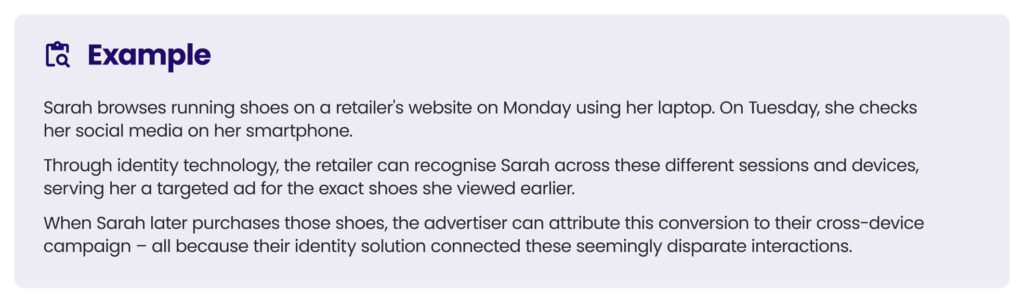
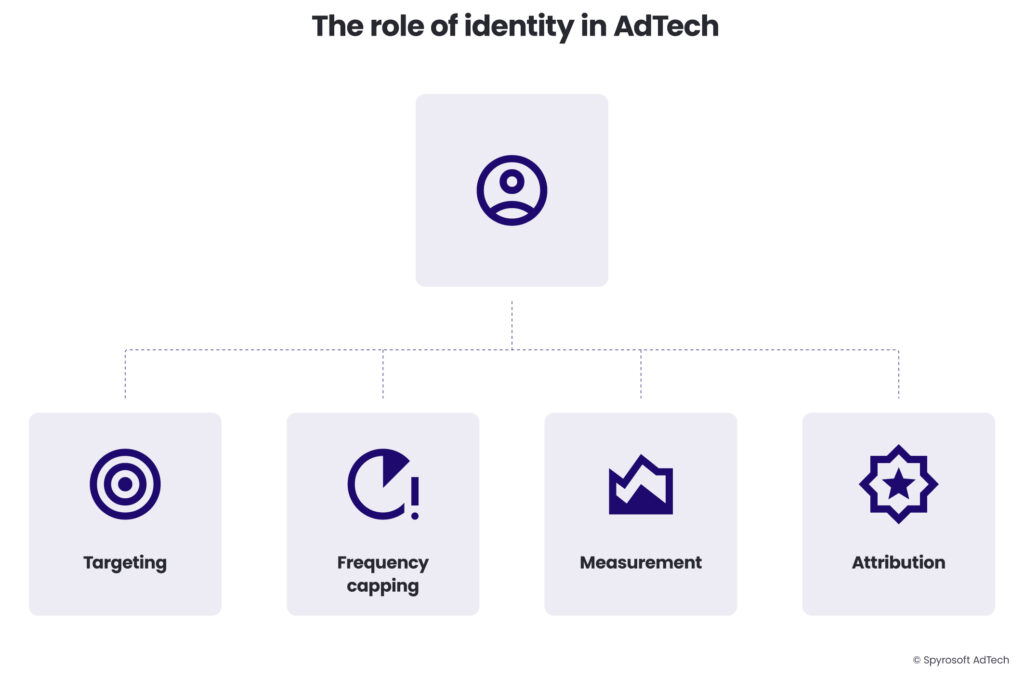
Identity in AdTech fulfills several essential functions:
- Targeting: Enabling personalised ads based on user interests and behaviours. When you research vacation destinations and later see ads for hotels in those locations, identity technologies have connected your research behaviour to your current browsing session.
- Frequency capping: Limiting how often a user sees the same ad, preventing ad fatigue while optimising exposure.
- Attribution: Connecting ad exposures to eventual conversions, helping advertisers understand which touchpoints influence purchase decisions.
- Measurement: Providing accurate tracking of campaign performance across touchpoints, distinguishing between reach (unique users) and frequency (repeated exposures).
Over the years, identity solutions have evolved from simple cookie-based tracking to complex systems that attempt to recognise users across different environments while balancing personalisation with growing privacy concerns.
Why do we need to identify users for advertising?
Before the internet, advertising was primarily delivered through mass media channels–television, radio, print, and billboards.
In this era, advertisers could only target broad demographic groups based on the audience composition of specific media outlets.
In the 1980s, a diaper brand seeking to reach new parents might place ads in parenting magazines or during daytime television shows popular with stay-at-home parents.
But this approach was inherently inefficient – many readers or viewers weren’t parents or had older children, resulting in wasted impressions.
Traditional advertising suffered from several key limitations:
- Limited targeting precision: Reaching specific audiences was difficult and inefficient
- Measurement challenges: Success was evaluated through imprecise metrics with weak attribution
- Inefficient media spend: Significant portions of ad budgets reached disinterested viewers
- One-size-fits-all messaging: Tailoring different messages to different segments wasn’t possible
The digital transformation of advertising
With the dawn of digital advertising, the fundamental dynamics of the industry changed. The internet made it technically possible to:
- Recognise individual users across websites and sessions
- Track interactions with ads and content
- Deliver personalised messages based on behaviour and interests
- Measure direct response to specific advertising touchpoints
To realise these capabilities, the industry needed methods to consistently identify users. Initially, this was accomplished through browser cookies, but as technology evolved and consumer behaviour fragmented across devices and platforms, identity solutions have grown increasingly sophisticated.
Critical advertising functions enabled by identity
The ability to identify users enables several critical advertising functions:
Personalised targeting allows for much more precise ad delivery. A travel site can show Caribbean vacation packages specifically to users who have been researching beach destinations, rather than to everyone visiting weather-related websites.
Frequency capping and sequencing prevents ad fatigue while enabling storytelling across multiple exposures. For example, a car manufacturer can ensure potential customers see their brand awareness ad first, followed by feature-focused ads, and finally a local dealership promotion – but no more than twice each over a 24-hour period.
Conversion attribution helps marketers understand which touchpoints drive action. For example, an e-commerce retailer can determine that their video ads on streaming platforms generate initial awareness, while their search ads drive final conversions – insights that inform future budget allocation.
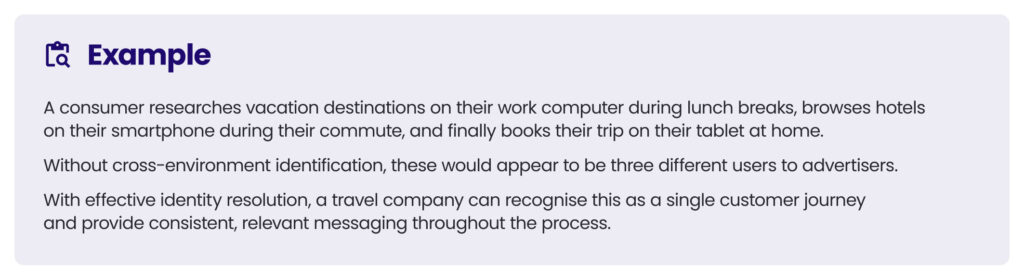
Cross-device continuity ensures seamless experiences as users switch between devices. For example, when a consumer researches apartments on their work computer, then checks listings on their phone during their commute, and finally applies for a lease on their tablet at home, identity solutions help apartment marketers maintain a consistent conversation throughout this journey.
Measurement and analytics provides the foundation for campaign optimisation and performance assessment. For example, a direct-to-consumer brand can determine that their ads perform 40% better with creative A versus creative B, specifically among users who previously visited their website but didn’t purchase.
In the programmatic ecosystem, where millions of ad impressions are bought and sold every second, identity serves as the currency that powers decisioning. When a user visits a website and an ad opportunity becomes available, the entire auction process – from bid request to creative selection – relies on identity signals to determine relevance and value.
The main user identification methods
The methods for identifying users vary significantly across different digital channels, each with unique technical approaches, capabilities, and limitations. These identification methods have evolved in response to both technological changes and growing privacy concerns.
Web advertising (browser-based)
In traditional web browsing environments, several identification methods dominate:
Cookies
Cookies are small text files stored on a user’s device that contain identifiers and other data.
These can be set by the website being visited (first-party cookies) or by external domains (third-party cookies). When you visit an e-commerce site and add items to your cart, a first-party cookie remembers these items even if you close your browser.
Similarly, when you see ads for products you’ve viewed previously, third-party cookies from advertising platforms like Google’s DoubleClick have tracked your browsing behaviour across sites.
See the Web cookies section below to learn more.
Device fingerprinting
Device fingerprinting creates a unique identifier by collecting information about a user’s browser settings and device characteristics without relying on cookies.
For example, a fingerprinting script might analyse your particular combination of browser version, installed fonts, screen resolution, and timezone to create a unique signature. Unlike cookies, fingerprints can’t be easily deleted by users.
See the Device fingerprinting section below to learn more.
Logged-in identifiers
Logged-in identifiers recognise users through their account credentials across sessions. When you log into websites using your Google, Facebook, or email account, these platforms can recognise you across different sites and sessions.
Amazon, for instance, knows exactly who you are and your purchase history whenever you’re logged in, allowing for highly personalised recommendations.
Mobile in-app advertising
Since mobile apps operate outside the browser environment, they rely on different identification methods:
Mobile advertising IDs (MAIDs)
Mobile advertising IDs (MAIDs) are platform-provided identifiers like Apple’s IDFA (Identifier for Advertisers) and Google’s Advertising ID (GAID) that allow tracking across apps on the same device.
For example, when you use a weather app followed by a news app, advertisers can recognise you across both apps using these identifiers.
However, Apple’s App Tracking Transparency framework now requires explicit permission from users before apps can access the IDFA.
App-specific identifiers
App-specific identifiers are unique IDs generated by individual apps or SDKs for tracking within their ecosystems. The fitness app Strava, for instance, uses its own identifier to track your workouts and activities within the app, independent of system-level identifiers.
Deterministic cross-app tracking
Deterministic cross-app tracking recognises users across multiple apps through consistent login credentials.

Connected TV (CTV) advertising
CTV environments present unique identification challenges due to their fragmentation and technical limitations.
IP-based targeting
IP-based targeting uses household IP addresses to approximate identity, though this typically identifies households rather than individuals.
When your smart TV, streaming device, and other household devices share the same internet connection, advertisers can associate these devices with the same household, but cannot distinguish between different family members using them.
Device IDs
Device IDs are unique identifiers assigned to specific CTV devices, similar to mobile advertising IDs. Roku, for example, assigns a unique Roku Advertising ID to each device, allowing advertisers to deliver consistent messaging across different Roku channels.
Platform-specific IDs
Platform-specific IDs are identifiers provided by streaming platforms for ad targeting within their ecosystems.
Hulu, for instance, uses its own ID system to recognise subscribers across different devices when they’re logged into their account.
Automatic content recognition (ACR)
Automatic content recognition (ACR) identifies content being watched and uses that data for targeting.
Smart TVs from manufacturers like Samsung or LG can analyse pixels on the screen to identify what shows or ads you’re watching, even when the content comes from external sources like cable boxes or gaming consoles.
Digital out-of-home (DOOH) advertising
DOOH refers to digital displays in public spaces, which have traditionally been anonymous channels but are increasingly incorporating identity elements:
Mobile device proximity
Mobile device proximity identifies nearby smartphones through WiFi, Bluetooth, or location data.
When you walk past a digital billboard in a shopping mall, sensors might detect your smartphone’s WiFi signal to estimate audience size and composition or even deliver synchronised ads to your mobile device.
Facial recognition
Facial recognition uses cameras and AI to estimate demographic characteristics of viewers.
Some advanced digital billboards can anonymously analyse faces in a crowd to determine approximate age, gender, and attention levels, allowing for real-time content optimisation.
QR codes and interactive elements
QR codes and interactive elements prompt user engagement that can be tied to personal devices.
A digital display might show a QR code offering a discount, and when scanned, this creates a bridge between the anonymous public display and your personal device.
Cross-environment identification
As users move between these different environments, AdTech companies attempt to maintain consistent identity in different ways:
Probabilistic matching
Probabilistic matching uses algorithms that infer connections between devices based on usage patterns.
If a smartphone and laptop consistently connect from the same IP addresses at similar times and browse similar content, they’re likely owned by the same person.
Deterministic matching
Deterministic matching establishes direct connections between devices through common identifiers like email addresses or login credentials.
When you log into your Netflix account on your smart TV, phone, and laptop, Netflix knows with certainty that these devices belong to the same user.
See the Deterministic vs probabilistic data section below to learn more.
ID graphs
ID graphs are databases that map relationships between different identifiers representing the same user or household.
Companies like LiveRamp and Tapad maintain massive databases connecting cookies, device IDs, email addresses, and other identifiers to create a comprehensive view of users across the digital landscape.
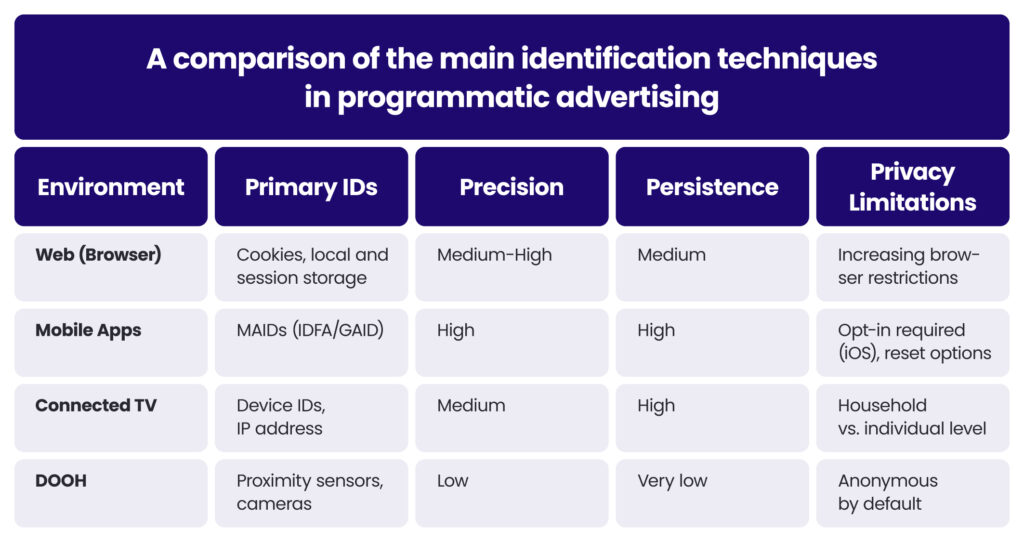
The effectiveness of cross-device identification methods varies significantly across environments.
Web cookies might identify users with 60-80% accuracy because of limitations like cookie deletion and browser restrictions. Mobile advertising IDs traditionally provided higher accuracy (80-90%) but are increasingly limited by privacy changes.
CTV identification often operates at the household level rather than identifying individuals, while DOOH remains primarily an anonymous channel with emerging identity capabilities.
As privacy regulations and platform policies continue to evolve, the identity landscape grows increasingly complex, requiring advertisers to develop sophisticated, multi-faceted approaches to user identification that balance personalisation needs with privacy requirements.
Deterministic vs probabilistic data
At the core of identity resolution are two fundamentally different approaches to connecting user identifiers: deterministic and probabilistic matching.
Understanding the distinction between these methods is crucial for grasping how the AdTech ecosystem builds user profiles across devices and platforms.
Deterministic data matching
Deterministic matching uses exact, known identifiers to connect user touchpoints with absolute certainty. This approach relies on authenticated information that definitively links different devices or browsers to the same user.
When a user logs into the same account across different devices – for example, signing into Gmail on both a smartphone and laptop – the service provider (Google, in this case) can establish with certainty that both devices belong to the same user. This creates a deterministic match based on the common login credential.

Examples of deterministic identifiers include email addresses, phone numbers, and account login credentials.
Deterministic matching offers several key strengths.
Firstly, its high accuracy provides near-100% confidence that identifiers belong to the same user, virtually eliminating false positives.
Secondly, its persistence remains stable over time as long as the user maintains the same accounts. Also, its cross-device capability can connect user identity across completely different environments – from web browsers to mobile apps to smart TVs.
However, deterministic matching also faces significant limitations.
Its limited scale requires users to authenticate or provide identifying information, which most users do only on a handful of sites. It’s often confined within large platforms (Google, Facebook, Amazon) that have logged-in users, creating walled gardens of identity.
It also raises privacy concerns by using personally identifiable information (PII), even if hashed or encrypted.
Probabilistic data matching
Probabilistic matching uses statistical algorithms and machine learning to infer connections between devices and browsers based on behavioural signals and patterns, without definitive logged-in connections.
Probabilistic matching analyses thousands of anonymous data points – such as IP addresses, location patterns, browsing behaviours, and temporal usage – to calculate the probability that different devices belong to the same user.
For example, if two devices consistently connect from the same IP addresses at similar times and visit similar websites, probabilistic algorithms might infer they belong to the same person.
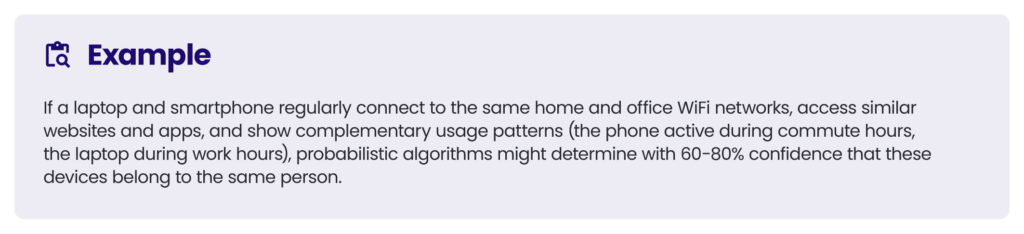
Examples of probabilistic signals include common IP addresses, similar browsing patterns, geographical proximity, temporal usage patterns (devices active at similar times), and content preferences and behaviour similarities.
Probabilistic matching offers greater scale by identifying connections without requiring user authentication. It works across the open web rather than being limited to walled garden environments. Its adaptability allows it to work across different environments and as signals change.
However, probabilistic matching has its own limitations.
Its lower accuracy typically reaches only 60-90% confidence levels, with false positives. Its statistical nature provides probability rather than certainty. Its complexity requires sophisticated algorithms and large datasets to achieve reasonable accuracy. Also, its sensitivity to change means user behaviour changes can disrupt matching.
Practical applications in AdTech
Most sophisticated identity solutions use a hybrid approach, combining deterministic and probabilistic methods to maximise both accuracy and scale.
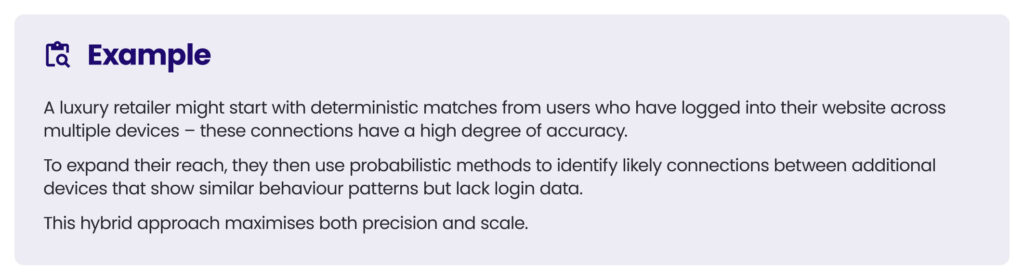
The reach vs precision trade-off in identity resolution
When evaluating identity solutions, there’s a fundamental trade-off between reach (scale) and precision (accuracy):
- High precision/lower reach: Pure deterministic matching provides high confidence but limited coverage. A streaming service like HBO Max knows exactly who you are when you’re logged in, but can’t recognise you elsewhere on the web.
- High reach/lower precision: Pure probabilistic matching offers expansive coverage but with uncertainty. A data management platform (DMP) might connect devices across the entire web, but with varying confidence levels.
- Balanced approach: Hybrid solutions attempt to optimise both dimensions. Companies like LiveRamp combine deterministic matches from their identity graph with probabilistic extensions to balance accuracy and scale.
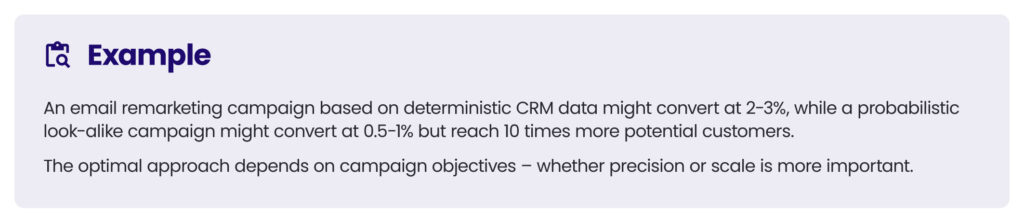
This balance directly impacts campaign performance.
Deterministic data typically delivers better conversion rates but reaches fewer users, while probabilistic methods enable broader reach but may include misattributed impressions.
As privacy regulations tighten and traditional identifiers become less available, the industry continues to refine both deterministic and probabilistic approaches, seeking new signals and methods that maintain effectiveness while respecting user privacy.
Web cookies
Cookies are small text files stored on a user’s device by websites they visit, containing data that helps sites remember user information and track their activity.
First introduced by Netscape in 1994, cookies have become the foundational technology for user identification in web-based advertising.
Despite their small size (typically less than 4KB), cookies have an outsized impact on the AdTech ecosystem, enabling everything from basic site functionality to complex cross-site tracking and ad personalisation.
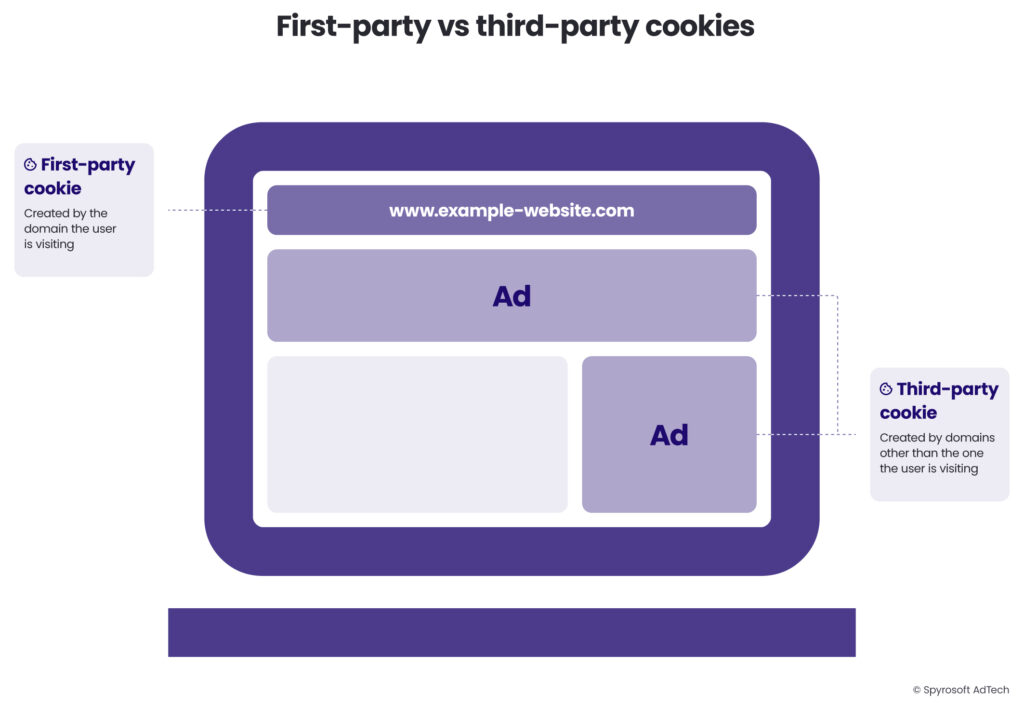
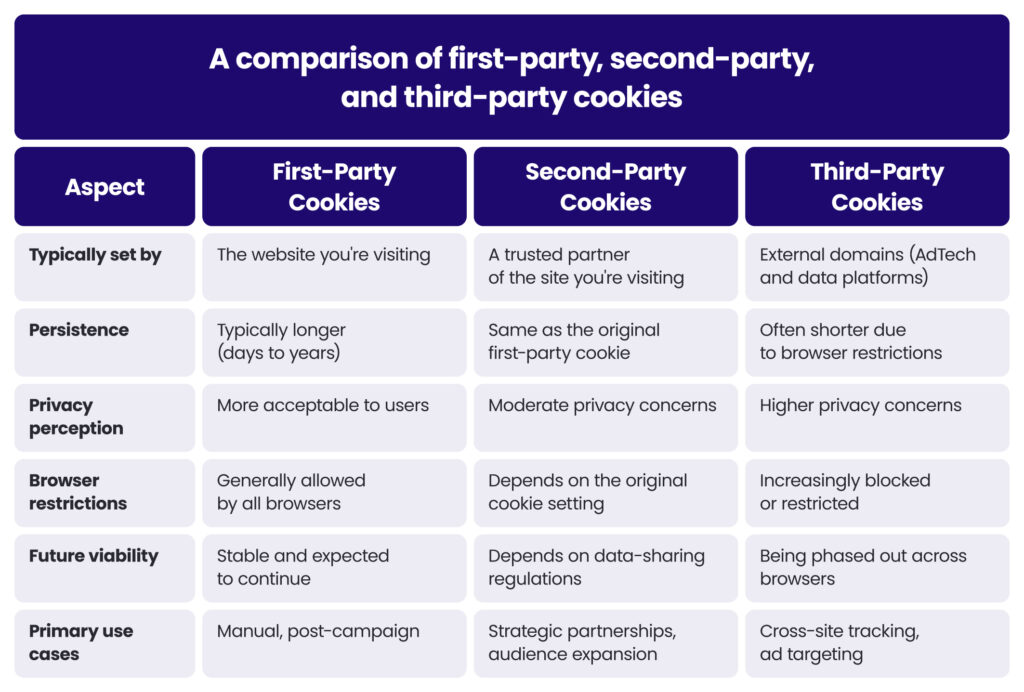
First-party, second-party, and third-party cookies
The classification of cookies depends on the relationship between the domain that sets the cookie and the domain the user is currently visiting.
First-party cookies
First-party cookies are created and stored by the website a user is directly visiting.
For example, when you log into an e-commerce site like Wayfair, the site places a first-party cookie on your browser that contains an encrypted identifier. This allows Wayfair to remember your login status, shopping cart items, and browsing preferences.
First-party cookies are created when a user visits a website and the site’s server instructs the user’s browser to store specific cookies through HTTP response headers or JavaScript code.
For example, a simplified cookie-setting command might look like:
Set-Cookie: user_id=12345; Domain=example.com; Expires=Wed, 09 Jun 2023 10:18:14 GMTThis creates a cookie named “user_id” with the value “12345” that persists until the specified expiration date.
First-party cookies are used for:
- Remembering user preferences and settings
- Storing login status and authentication tokens
- Saving shopping cart contents
- Tracking on-site behaviour for analytics
- Personalising content based on browsing history
Second-party cookies
Second-party cookies are not technically a distinct cookie type but rather a data-sharing arrangement between two organisations.
For example, an airline and a hotel chain might form a partnership where the airline shares its first-party cookie data about customers who searched for flights to specific destinations. The hotel chain can then use this data to show targeted offers to these travellers.
How second-party cookies are used:
- Data partnerships between complementary brands
- Expanding audience reach through shared customer insights
- Enhancing audience profiles with additional attributes
Third-party cookies
Third-party cookies are set by domains other than the one the user is currently visiting.
Imagine you’re reading an article on The New York Times website. The page contains an ad served by Google’s ad network. When that ad loads, Google’s servers set a third-party cookie on your browser. Later, when you visit The Washington Post that also loads an ad from Google’s servers, Google recognises you via that same cookie.
When a website includes elements from external domains (like ad tags, tracking pixels, or social media buttons), these external domains can set their own cookies.
Third-party cookies are used for:
- Cross-site tracking of user behaviour
- Building user profiles for targeted advertising
- Ad retargeting across different websites
- Frequency capping and conversion tracking
- Measuring ad campaign performance
Cookie syncing
Because third-party cookies are domain-specific, different AdTech platforms can’t directly access each other’s cookies.
This limitation gave rise to cookie syncing (also called cookie matching) – a process that allows different platforms to align their identifiers for the same user.
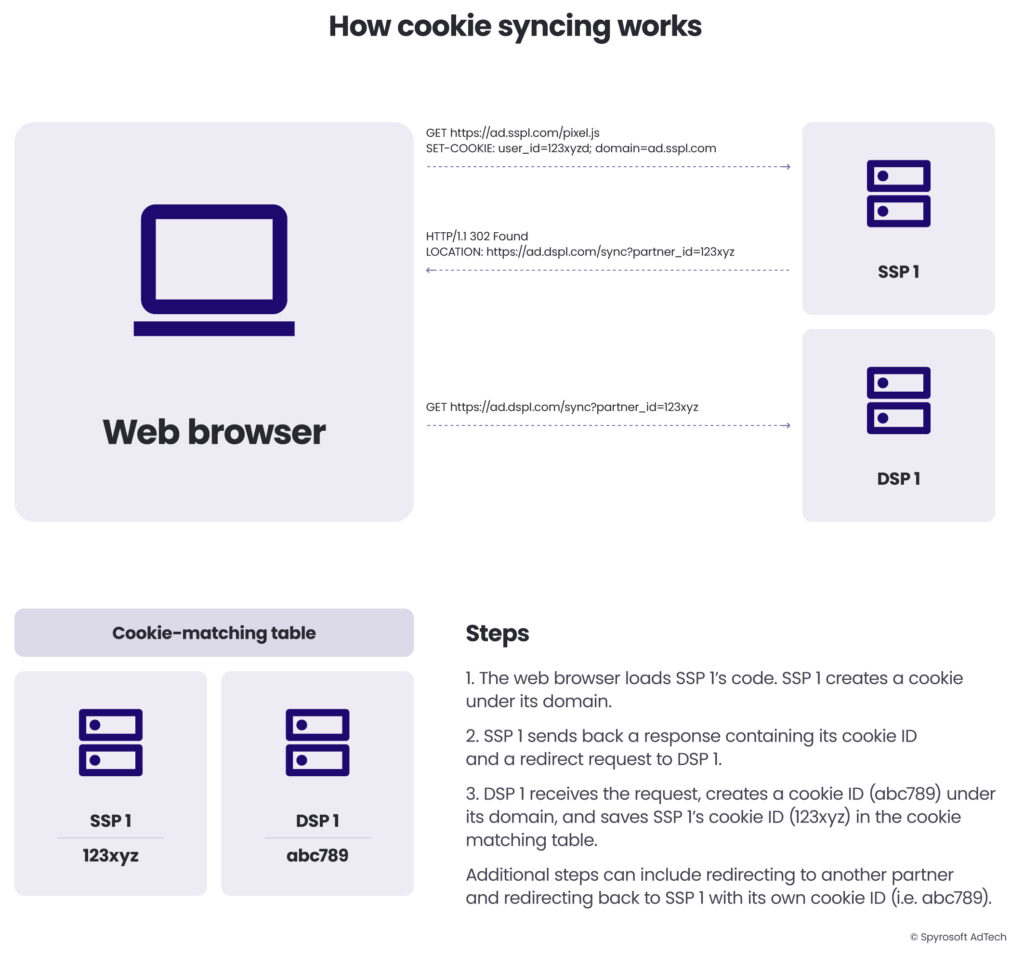
Here’s how cookie syncing works in practice:
- When a user loads a web page containing ad tags or trackers from an SSP, a request is sent to the SSP.
- The SSP receives the request and creates a cookie under its domain and saves it to the user’s web browser, if one doesn’t exist already.
- The SSP initiates a cookie sync with one or more of its AdTech partners, e.g. a DSP. In which case, the SSP would send back a response to the web browser with a redirect request to its DSP partner. The SSP would append its cookie ID to the URL, e.g. https://ad.dsp1.com/partner_id=123xyz
- The DSP receives the request, reads the cookie from the SSP and creates a cookie under its own domain on the user’s device (e.g. abc789).
- The DSP then adds its cookie and the SSP’s cookie to a cookie matching table.
- From now on, when the DSP sees a cookie with the ID 123xyz, it knows that it is the cookie that it created for the same user, i.e. abc789
- The DSP could also take some additional steps, such as:
- Load another redirect request to another AdTech platform.
- Execute a bi-directional sync whereby the DSP sends back a request to the SSP with its cookie ID in the URL so that the SSP can save the DSP’s cookie ID in its cookie-matching table.
This process enables a seamless programmatic ecosystem where dozens of different platforms can recognise the same user despite each having their own proprietary identifier system.
Without cookie syncing, each platform would maintain isolated user profiles, severely limiting the effectiveness of programmatic advertising.
Cookie syncing enables cross-platform recognition by identifying the same user across different AdTech systems, data enrichment by combining user attributes from multiple platforms, consistent frequency capping by controlling ad exposure across different inventory sources, and comprehensive attribution by tracking user journeys across platforms.
However, cookie syncing also introduces challenges:
- The match rate between platforms is typically only 60-80%, meaning some user identities are lost in translation.
- The syncing process adds time to ad serving, potentially affecting page load speeds.
- Extensively sharing user IDs across the ecosystem raises regulatory red flags under laws like GDPR and CCPA.
- Managing sync processes across hundreds of AdTech partners is operationally challenging.
As third-party cookies face deprecation, cookie syncing is becoming less relevant and the industry is developing alternative synchronisation methods using universal IDs, first-party data, and privacy-enhancing technologies.
The privacy implications of third-party cookies
As third-party cookies became more sophisticated and widespread, their privacy implications grew more significant, eventually triggering regulatory responses and browser restrictions.
Key privacy concerns of third-party cookies
- Transparency issues: Many users don’t understand how cookies track them across sites.
- Lack of meaningful consent: Cookie banners often provide limited options or are designed to nudge users toward acceptance.
- Profile building: Extensive tracking builds detailed behavioural profiles without user awareness.
- Data security: Cookie data can potentially be exploited in data breaches or for fingerprinting.
- Long-term persistence: Some cookies remain active for years, enabling extended tracking.
These concerns led to major privacy regulations like the European Union’s General Data Protection Regulation (GDPR) and the California Consumer Privacy Act (CCPA), which imposed strict requirements on cookie usage, particularly for third-party tracking.
The end of third-party cookies in web browsers
In response to growing privacy concerns, major browsers have taken steps to limit or eliminate third-party cookies:
- Apple’s Safari web browser implemented Intelligent Tracking Prevention (ITP) in 2017, effectively blocking third-party cookies and limiting first-party cookie lifespans to seven days in many cases. This was a significant blow to cross-site tracking on iOS and macOS devices.
- Mozilla’s Firefox web browser enabled Enhanced Tracking Protection (ETP) by default in 2019, blocking known tracking cookies and isolating others to prevent cross-site tracking. Firefox’s approach uses a blocklist of known trackers combined with technical measures to prevent fingerprinting.
- Google Chrome announced plans to phase out third-party cookies, with full deprecation expected by late 2025. Google’s approach differed from Apple and Mozilla by attempting to develop replacement technologies through its Privacy Sandbox initiative rather than simply blocking cookies without alternatives. However, in April 2025, Google Chrome announced that it would be keeping third-party cookies and retiring many of the key Privacy Sandbox technologies.
Google’s original decision to phase out third-party cookies in Chrome represented a seismic shift for the AdTech industry, given Chrome’s dominant market share (approximately 65% of global browser usage).
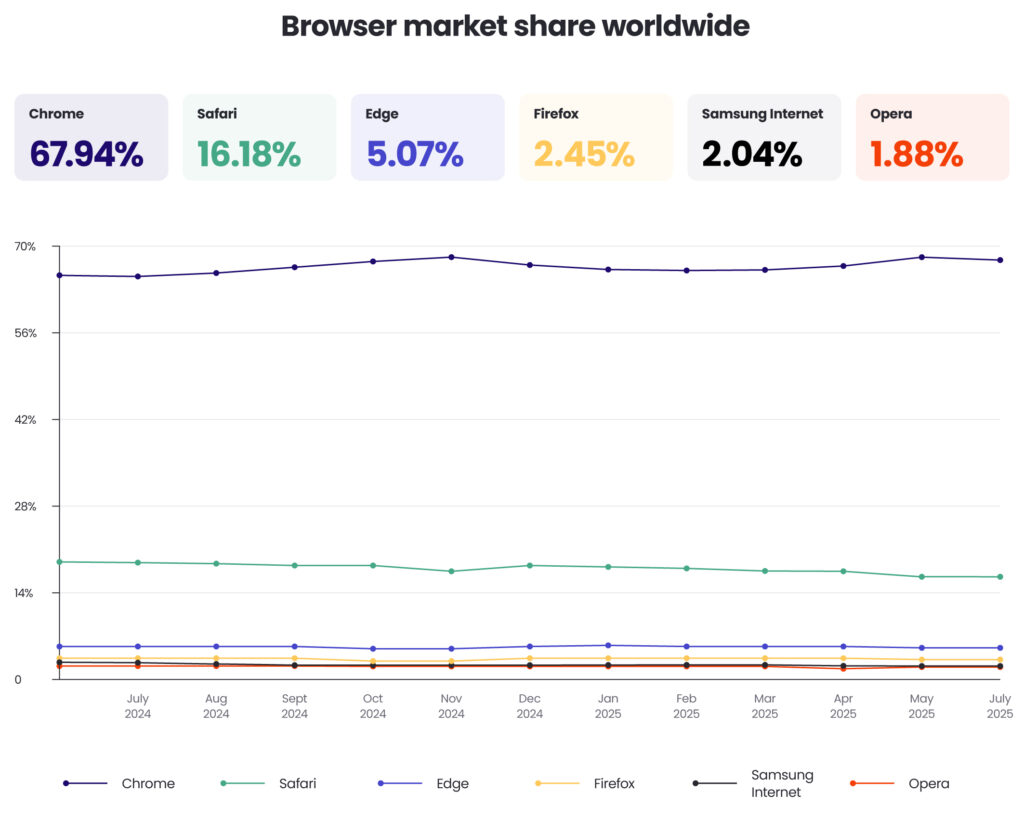
This change prompted a race to develop alternative identification solutions that balance personalisation capabilities with enhanced privacy protections.
Although Google Chrome will continue to support third-party cookies, many companies are still moving away from them and adopting more privacy-friendly identification methods.
Impact on advertising functions
The end of third-party cookies affects different advertising functions in various ways:
- For retargeting, which relies heavily on third-party cookies to recognise users across websites, the impact is severe. Brands can no longer easily show ads for products users previously viewed when third-party cookies are blocked. Companies are exploring alternatives like first-party data activation and contextual targeting.
- For measurement and attribution, connecting ad views to conversions across different sites becomes much more difficult without third-party cookies. The industry is moving toward probabilistic attribution, clean room technologies, and aggregate-level measurement models.
- For audience targeting, building behavioural segments across the open web is greatly limited by cookie restrictions. Advertisers are shifting focus to first-party data strategies, contextual relevance, and cohort-based targeting approaches.
Alternatives to third-party cookies
In light of the decline of third-party cookies due to privacy regulations and changes to privacy policies, the programmatic advertising industry is adopting various alternatives to address the cookie challenge.
Universal IDs
Universal IDs, also known as alternative IDs, in programmatic advertising are user identifiers designed to replace third-party cookies for audience targeting, measurement, and frequency capping across the open web.
Unlike cookies that are browser-specific and siloed, universal IDs offer a persistent, interoperable identity that can be shared across platforms and AdTech platforms. They help advertisers and publishers maintain addressability, often relying on deterministic data, such as email logins, and/or probabilistic signals.
There are over 80 universal ID solutions on the market, with the main ones being The Trade Desk’s Unified ID 2.0, ID5, and LiveRamp’s RampID.
These IDs aim to support personalised advertising while aligning with evolving data privacy regulations and browser restrictions.
Although universal IDs are used in a very similar way to third-party cookies, they lack the same scale. When all major web browsers supported third-party cookies, around 75% of marketers globally used them in their advertising operations.
With universal IDs, their availability is much lower.
A report from ID5 found that in 2022, 59% or publishers reported having less than 10% of their website visitors logged in. This is due to extra steps required to generate them; Internet users usually need to provide a piece of deterministic data, such as an email.
The IAB Tech Lab’s Curated Audiences (formerly Seller Defined Audiences)
Curated Audiences, formerly known as Seller Defined Audiences (SDA), is an IAB Tech Lab initiative that enables publishers and data providers to create and share audience segments using first-party data—without relying on third-party cookies.
The framework allows sellers to define audience cohorts based on user behaviour, content consumption, or contextual signals, and then communicate these segments programmatically using standardised metadata.
Curated Audiences promote greater transparency and control for publishers, enabling them to monetise their audiences in privacy-compliant ways while maintaining addressability in a cookieless environment.
Google’s Privacy Sandbox
Google’s Privacy Sandbox is a set of privacy-focused initiatives aimed at building a more secure and sustainable web advertising ecosystem by phasing out third-party cookies in Chrome while still supporting key advertising use cases.
The Privacy Sandbox introduces new web standards that allow for interest-based targeting, measurement, and fraud prevention—without enabling cross-site tracking.
The key standards include:
- Topics API (replacing FLoC), which enables interest-based advertising based on recent browsing activity.
- Protected Audience API (formerly FLEDGE), which supports on-device remarketing and custom audiences.
- Attribution Reporting API, which facilitates privacy-safe ad measurement.
- CHIPS (Cookies Having Independent Partitioned State), which allows embedded services to use cookies in a more privacy-conscious way.
Google’s original plan was to build a privacy-friendly solution that would replace the key functionalities carried out by third-party cookies.
After years of announcements around the end of third-party cookies and the subsequent delays, Google stated in April 2025 that it won’t be shutting down support for third-party cookies and retiring many of its Privacy Sandbox technologies.
First-party data strategies and data clean rooms
In programmatic advertising, first-party data strategies have become essential as third-party cookies are phased out and privacy regulations tighten.
Advertisers and publishers are increasingly using data collected directly from users—such as email addresses, purchase history, and site behaviour—to build audience segments, personalise campaigns, and measure performance.
To activate this data in a privacy-compliant way, many are turning to data clean rooms—secure, neutral environments where multiple parties, such as an advertiser and publisher, can match and analyse data sets without sharing raw user-level information.
Data clean rooms enable functions like audience overlap analysis, attribution modelling, and campaign effectiveness measurement, all while preserving user privacy through encryption and access controls.
However, in order to accurately match data in a data clean room, each party needs to have matching IDs. Increasingly, universal IDs are used to help find a match across different data sets.
This combination of first-party data and clean room infrastructure allows brands and media owners to collaborate more effectively, optimise media spend, and maintain addressability in a privacy-first landscape.
The demise of third-party cookies and the rise of alternative solutions is creating a fragmented environment that will likely result in a fundamental restructuring of how digital advertising identifies and targets users, with significant implications for personalisation, measurement, and attribution.
Device fingerprinting
As cookies face increasing restrictions, some AdTech companies have turned to device fingerprinting as an alternative identification method.
Unlike cookies, fingerprinting doesn’t store information on the user’s device but instead creates a unique identifier based on the device’s characteristics and settings.
What is device fingerprinting?
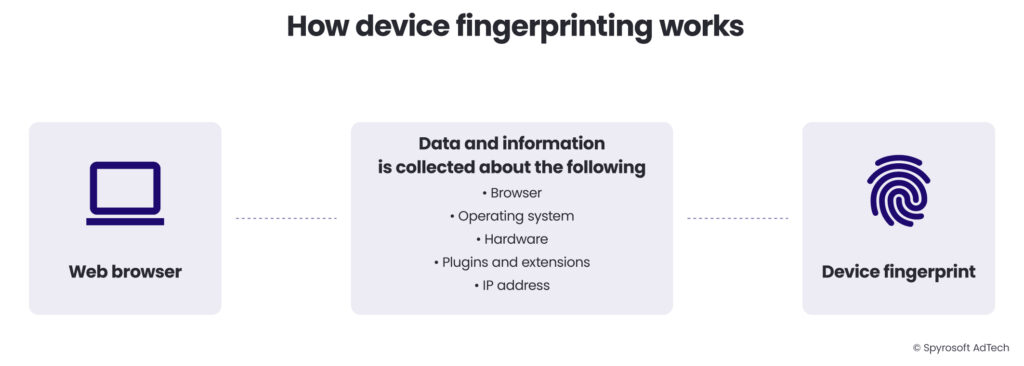
Device fingerprinting (also called browser fingerprinting) is a technique that collects information about a user’s device configuration, browser settings, and system attributes to create a unique identifier.
Just as human fingerprints are unique, the combination of technical attributes from a device can create a distinctive “fingerprint” that can be used to recognise that device across websites.
The uniqueness factor
The Electronic Frontier Foundation’s Panopticlick research project found that the combination of just a few browser characteristics – like installed plugins, timezone, screen size, and system fonts – was enough to uniquely identify 94.2% of browsers tested.
When more sophisticated techniques like canvas fingerprinting were added, identification accuracy increased further.
How does device fingerprinting work?
The fingerprinting process typically involves several steps:
1. Data collection
When a user visits a website with fingerprinting code, the script collects various device and browser attributes:
- Browser information: Type, version, language settings
- Operating system details: Name, version, language
- Hardware specifications: Screen resolution, colour depth, GPU information
- Installed plugins and fonts: Types and versions
- Time and location data: Time zone, regional settings
- Network information: IP address, connection type
- Advanced techniques:
- Canvas fingerprinting: Rendering differences in how the browser draws images
- Audio fingerprinting: Subtle differences in audio processing
- WebRTC implementation details: Network configuration information
2. Hash generation
These parameters are combined and processed through a hashing algorithm to create a compact identifier.
3. Recognition
When the same user returns to any site using the same fingerprinting service, the system recreates the fingerprint and matches it against previously stored values.
4. Profile updating
As the fingerprint is recognised across different sites, user behaviour can be tracked and profiles updated accordingly.
How does device fingerprinting work?
The fingerprinting process typically involves several steps:
When a user visits a website with fingerprinting code, the script collects various device and browser attributes.
A real-world example is the canvas fingerprinting technique, where a website asks the browser to draw an invisible image.
Tiny variations in how different devices render the image – due to differences in hardware, operating systems, and graphics drivers – create a unique signature.
For instance, the script might execute code like this:
javascript

const canvas = document.createElement('canvas');
const ctx = canvas.getContext('2d');
ctx.textBaseline = "top";
ctx.font = "14px 'Arial'";
ctx.fillText("How quickly daft jumping zebras vex.", 2, 2);
const dataURL = canvas.toDataURL();

// The resulting image data becomes part of the fingerprint
These parameters are combined and processed through a hashing algorithm to create a compact identifier.
When the same user returns to any site using the same fingerprinting service, the system recreates the fingerprint and matches it against previously stored values.
As the fingerprint is recognised across different sites, user behaviour can be tracked and profiles updated accordingly.
Consider this practical application:
A user clears their cookies and switches to private browsing mode before shopping for engagement rings, thinking their activity is private.
However, the jewelry retailer’s website uses fingerprinting to recognise the device.
Later, the user sees targeted ads for engagement rings on various websites, despite having cleared their cookies – an experience many users find unsettling.
Why do companies use device fingerprinting?
Companies rely on device fingerprinting for several reasons, many of which relate to its ability to persist and operate where traditional cookie-based identifiers fail.
1. Device fingerprinting is not dependent on cookies
Because it continues to function even when cookies are blocked, deleted, or restricted, it is commonly used as a fallback identification method in privacy-focused browsers.
2. Some advanced fingerprinting techniques support cross-browser tracking
While cookies are tied to a specific browser, many device-level attributes remain consistent across browsers, allowing companies to identify the same device even when a user switches between Chrome, Safari, Firefox, or others.
3. Fingerprinting offers persistence
Unlike cookies—which users can clear at any time—fingerprints remain stable until the user makes significant changes to their device configuration. This makes fingerprinting more resistant to routine privacy practices such as clearing browser data.
4. Fingerprinting is a valuable tool in fraud prevention
Banks and e-commerce platforms use it to spot suspicious login attempts, stop account takeovers, and detect when an unfamiliar device tries to access a customer’s account.
5. Fingerprinting also plays a role in paywall enforcement
Publishers use it to identify readers who repeatedly exceed article limits. The New York Times, for instance, employs multiple techniques to recognise returning users—even across different browsers or in private browsing modes.
6. Device fingerprinting provides resilience in ad targeting
As cookie-based advertising faces growing restrictions, fingerprinting offers AdTech companies an alternative method for maintaining personalisation and audience targeting.
Privacy implications of device fingerprinting
Device fingerprinting raises substantial privacy concerns, in many ways exceeding those associated with cookies.
The lack of transparency and user control are particularly problematic as unlike cookies, which can be viewed and managed through browser settings, fingerprinting operates invisibly to the average user.
Most people have no idea fingerprinting is happening or how to prevent it.
At the same time, no opt-out mechanism exists in standard fingerprinting implementations.
While cookies can be deleted or blocked, users have no straightforward way to opt out of or clear their fingerprint identifiers.
Bypassing privacy choices is another concern. Fingerprinting can override explicit user preferences, such as private browsing modes or cookie blocking, effectively circumventing the privacy tools built into browsers.
Regulatory challenges arise because many privacy regulations focus on cookies and stored identifiers, creating ambiguity around fingerprinting techniques. This regulatory gap has allowed fingerprinting to operate in a gray area.
The potential for misuse stems from the covert nature of fingerprinting, making it attractive for malicious tracking or surveillance beyond legitimate advertising purposes.
Due to these concerns, fingerprinting has faced increasing scrutiny from privacy advocates, regulators, and browser developers. Major browsers have implemented countermeasures:
- Firefox has introduced anti-fingerprinting protections in its Enhanced Tracking Protection, including techniques like canvas fingerprinting blocking and reducing the precision of certain device attributes to make users less individually identifiable.
- Safari uses Intelligent Tracking Prevention to limit fingerprinting capabilities, implementing similar protections that standardise device information to make Apple device users appear more similar to each other.
- Brave blocks fingerprinting by default through its Shields feature, taking one of the most aggressive approaches to preventing this form of tracking.
- Chrome has announced plans to restrict fingerprinting as part of its User-Agent reduction and User-Agent Client Hints proposals, which are part of its Privacy Sandbox initiative. It’s worth noting that these proposals focus more on limiting the scope of fingerprinting rather than blocking it entirely.
As with cookies, the advertising industry faces a balancing act between leveraging device fingerprinting for identification and respecting growing demands for user privacy.
The technical arms race continues, with fingerprinting methods evolving in sophistication as browser defenses adapt in response.
Download the PDF & join our waiting list
Fill in the form to download the PDF version and get notified when the next chapters are released.